DMARC Reports Stopped? Don’t Read That As Good News
Yesterday your DMARC aggregate reports showed Google Workspace, Microsoft 365, and your transactional sender. Today: nothing. No failures, no new sources, no alerts.
That can mean your mail is clean.
It can also mean your reporting address broke, a DNS edit silently dropped rua=, a mailbox rule started swallowing attachments, or a receiver stopped sending reports because it couldn’t verify your external destination. If you’re on your way to p=quarantine or p=reject, that silence is dangerous: you’d be making policy decisions with no telemetry to back them.
This is a checklist for the person who owns DNS and mail flow. The goal: prove whether traffic actually went quiet, or your reporting pipeline is just blind.
First: confirm the DMARC record receivers actually see
Don’t trust the value shown in your registrar’s UI. Query public DNS directly.
dig TXT _dmarc.example.com +shortYou want exactly one DMARC TXT record. If there are two, receivers discard both. The domain behaves as if it published no DMARC record at all, not as if either policy applies.
A healthy monitoring record looks like this:
"v=DMARC1; p=none; rua=mailto:reports@example.com"Check this against whatever mailbox or tool you set the RUA address up with originally, not a leftover personal mailbox from before you switched providers.
Check these failure modes first, in order of how often they actually happen:
rua=missing entirely after a DNS cleanup- a typo in
mailto:(mailito:, or a missing@) - an old RUA address left over from a previous internal mailbox
- two DMARC TXT records published at the same host
- a missing semicolon between tags in a hand-edited record
- a DNS panel that appended your domain again, producing
_dmarc.example.com.example.com
Fix the DNS answer before investigating anything downstream. Receivers can only send reports to the address they see published.
Check whether the report destination is external
A RUA address on your own domain is simple:
v=DMARC1; p=none; rua=mailto:dmarc-reports@example.comA RUA address on a different domain adds a requirement some teams miss. If example.com sends its reports to reports@monitoring.example.net, some receivers check whether example.net explicitly authorizes that before they’ll send anything there. The authorization record lives here:
dig TXT example.com._report._dmarc.example.net +shortExpected value:
"v=DMARC1"If that record is missing, some receivers quietly stop sending to the external address instead of bouncing anything. You won’t see an error, just fewer reports, or none.
This bites teams during migrations. You move from an internal collector mailbox to a third-party reporting address, update rua=, and forget the authorization record on the new destination. A week later the dashboard looks quiet and everyone assumes the domain is clean. (If your rua= points at DMARC Guardian, this one is covered: dmarc-guardian.com publishes a wildcard *._report._dmarc record, so dig TXT example.com._report._dmarc.dmarc-guardian.com +short returns "v=DMARC1" for any domain.) It’s worth checking this every time you’re switching providers, since that’s the most common trigger.
Verify the mailbox path, not just DNS
If you collect reports in your own mailbox before forwarding or ingesting them, test the whole path. DNS being correct doesn’t mean the report actually reaches anything useful.
Aggregate reports arrive as compressed XML attachments (.zip or .gz). These are the boring ways that path breaks:
- a security gateway strips compressed attachments
- a mailbox rule files reports into an archive folder before ingestion runs
- IMAP credentials expired
- the mailbox hit its storage quota
- a spam filter routes report emails away from the inbox
- a parser expects a specific filename pattern and silently drops anything else
If a tool is ingesting reports for the domain, check whether its last-report timestamp for that domain moved recently. In DMARC Guardian, a domain that used to report regularly and then goes quiet gets a reporting-gap notice on the dashboard. It’s a flag on the domain, not an email alert, so it only helps if someone looks.
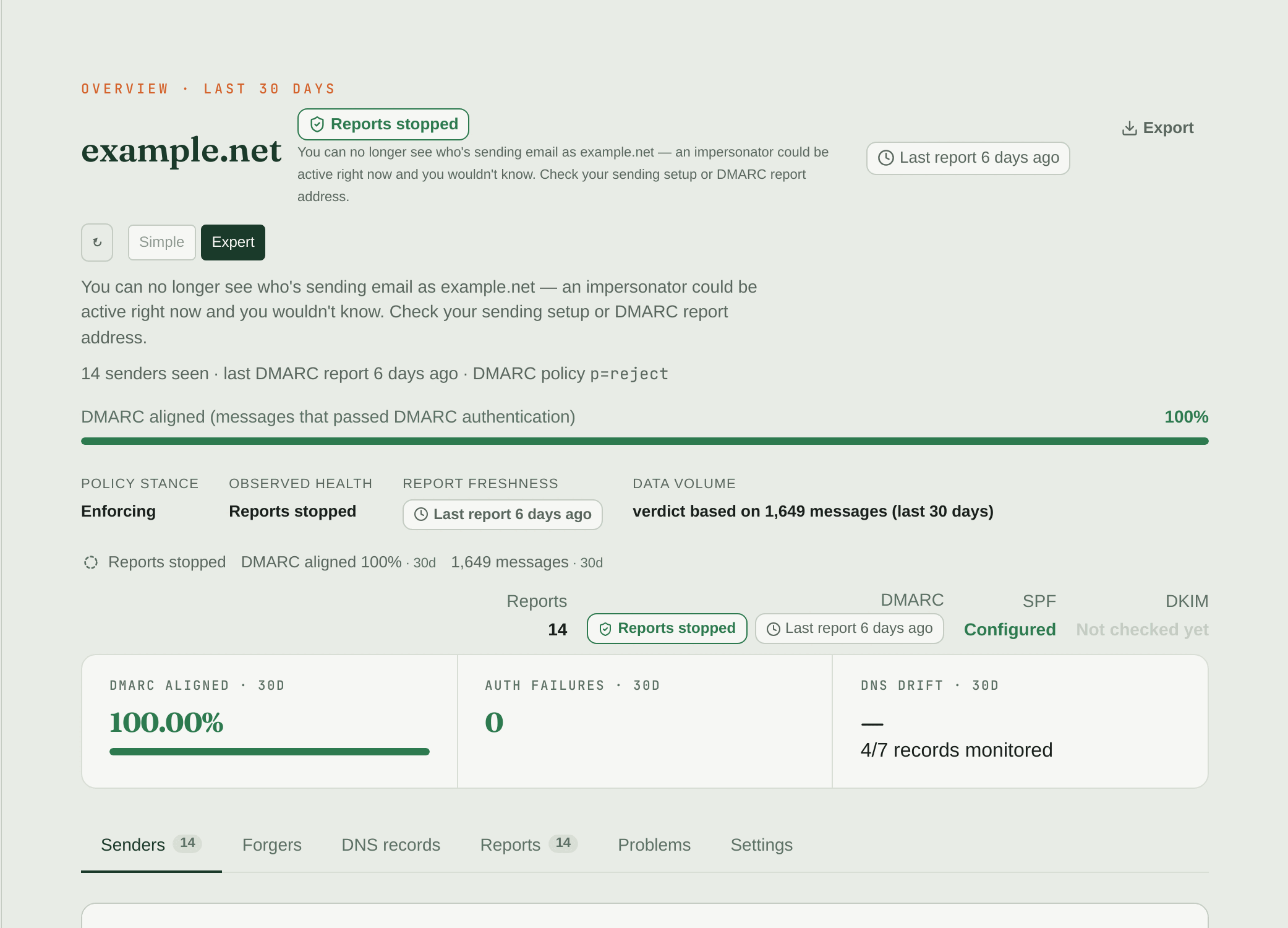
That kind of notice tells you the pipeline noticed the gap. It doesn’t tell you why. That’s still the checklist above.
Compare sending volume against report volume
Zero reports can be completely legitimate if nobody sent mail using the domain during the report window. Prove that before declaring victory.
Check every system that sends mail for the domain: Microsoft 365 or Google Workspace users, your transactional provider, marketing platform, helpdesk, CRM sequences, billing notifications. Pick a message you know was sent yesterday, open the received copy in Gmail, and check Show original for Authentication-Results:
Authentication-Results: mx.google.com;
  spf=pass smtp.mailfrom=bounce.example.com;
  dkim=pass header.d=example.com;
  dmarc=pass (p=NONE sp=NONE dis=NONE) header.from=example.com
That tells you two things: mail actually left your domain during the window, and at least one receiver evaluated DMARC for it. If mail went out and got evaluated but no aggregate report showed up later, your problem is the reporting path, not a lack of traffic.
Watch for partial silence
The dangerous case isn’t always zero reports. Sometimes only one reporter goes quiet while the rest keep arriving.
reporter                    last_seen_utc
------------------------------------------------
google.com                  2026-08-01 02:14
enterprise.protection...    2026-07-30 01:03
yahoo.com                   2026-08-01 05:44
Don’t average that away. A missing major reporter removes a whole slice of your mail stream from the evidence. If most of your customers are on Microsoft consumer mailboxes and Microsoft’s reports disappeared, your dashboard can look clean while the audience that actually matters is invisible. Treat 48 hours of silence from a reporter that normally shows up daily as a reason to investigate, not a coincidence.
Check DNS TTL and propagation after edits
DMARC records are cached by TTL. If you changed rua= this morning, some receivers may still be using the old address until their cache expires.
# Replace ns1.provider.example.net with your authoritative nameserver
dig @ns1.provider.example.net TXT _dmarc.example.com +short

# Public resolver view
dig @1.1.1.1 TXT _dmarc.example.com +short
dig @8.8.8.8 TXT _dmarc.example.com +short
If authoritative DNS shows the new record but public resolvers still show the old one, wait out the TTL. If authoritative DNS itself is wrong, that’s the actual bug, fix the source of truth.
Do not move policy while reports are missing
This is the rule that prevents a self-inflicted outage: if aggregate reports are unexpectedly missing, don’t move from p=none to quarantine, or from quarantine to reject. You need reports to know which legitimate senders still fail alignment, without them you’re enforcing blind. If you’re mid-rollout, the full staged plan covers exactly when it’s safe to tighten policy and when to hold.
A safe gate before moving policy looks like this:
- Reporters that normally appear are still producing recent data, no unexplained gaps.
- Every known sender shows up in aggregate data.
- No unknown high-volume source failing DMARC.
- No SPF
permerror. - Every legitimate sender has at least one aligned SPF or DKIM pass.
- A rollback DNS record is prepared before you touch policy.
Quick incident checklist
dig TXT _dmarc.example.com +short— confirm exactly one valid record.- Confirm
rua=mailto:...points to the address you actually intended. - If the RUA domain is external, check
_report._dmarcauthorization. - Compare authoritative DNS against a public resolver view.
- Confirm mail actually left the domain during the report window.
- Inspect a received message’s
Authentication-Resultsheader. - Check mailbox quota, spam folder, attachment stripping, and IMAP access for self-hosted ingestion.
- Compare per-reporter last-seen timestamps, not just total report count.
- Freeze DMARC policy changes until reporting is normal again.
Silence is only useful once you’ve proven the microphone is still on. Once reports resume, here’s how to actually read them instead of drowning in the XML.
Get the reporting-gap flag on your dashboard instead of rebuilding this checklist by hand →