Got a DMARC Report Email? Here’s What It Means
You open your inbox and there’s an email like this:
Subject: Report Domain: example.com Submitter: google.com
Attachment: example.com!google.com!1757980800!1758067200.zip
Inside the zip is an XML file full of angle brackets and no punctuation you recognize. It looks like spam. It looks like something got hacked. Your first instinct is to delete it.
Don’t. It’s neither.
What this actually is
A few weeks or months ago, you (or whoever set up your app’s email) added a DMARC record to your domain’s DNS. That record does two things: it tells mailbox providers what to do with email that fails authentication, and it asks them to send you a report about what they saw. This is that report.
It’s not addressed to you personally, it’s not a warning about your account, and it’s not evidence anyone broke in. It’s routine machine mail. Google, Microsoft, and other large mailbox providers send one of these to every domain that asks for them, once a day, whether anything is wrong or not. Most days, nothing is. The standard calls for “daily (or more frequent)” reports, which is exactly the cadence you’re seeing.
If you want the full “what is SPF/DKIM/DMARC” explanation before going further, read this first. If you just want to know what to do with the email in front of you, keep reading.
The three or four things worth checking
You don’t need to open the XML by hand, and you don’t need to understand every tag in it. A viewer turns the file into a table. Once it’s a table, you’re really only checking these:
- Who sent this mail. Every report lists one or more sources, usually by IP address, sometimes with a provider name attached. Do you recognize it as something you use (your transactional email tool, Google Workspace, your invoicing software)? Or is it nothing you can place?
- How much mail it sent. A source you don’t recognize sending one message is background noise. The same source sending thousands is worth ten minutes of investigation.
- Whether it passed or failed. Each source gets an SPF result and a DKIM result, plus an overall DMARC pass/fail. A sender you rely on that’s failing DMARC is the case that costs you money: a password reset or an invoice that might not be landing.
- What the receiver did about it. This shows up as
none,quarantine, orreject— the standard calls this field the “disposition”. It tells you what action the mailbox provider took on failing mail, not necessarily what the person on the other end actually saw.
That’s the whole report reduced to size. For the full field-by-field breakdown (every tag, what policy_evaluated and disposition actually mean, common error codes) see reading DMARC aggregate reports without drowning in XML. This post stays at the “what do I do every week” level.
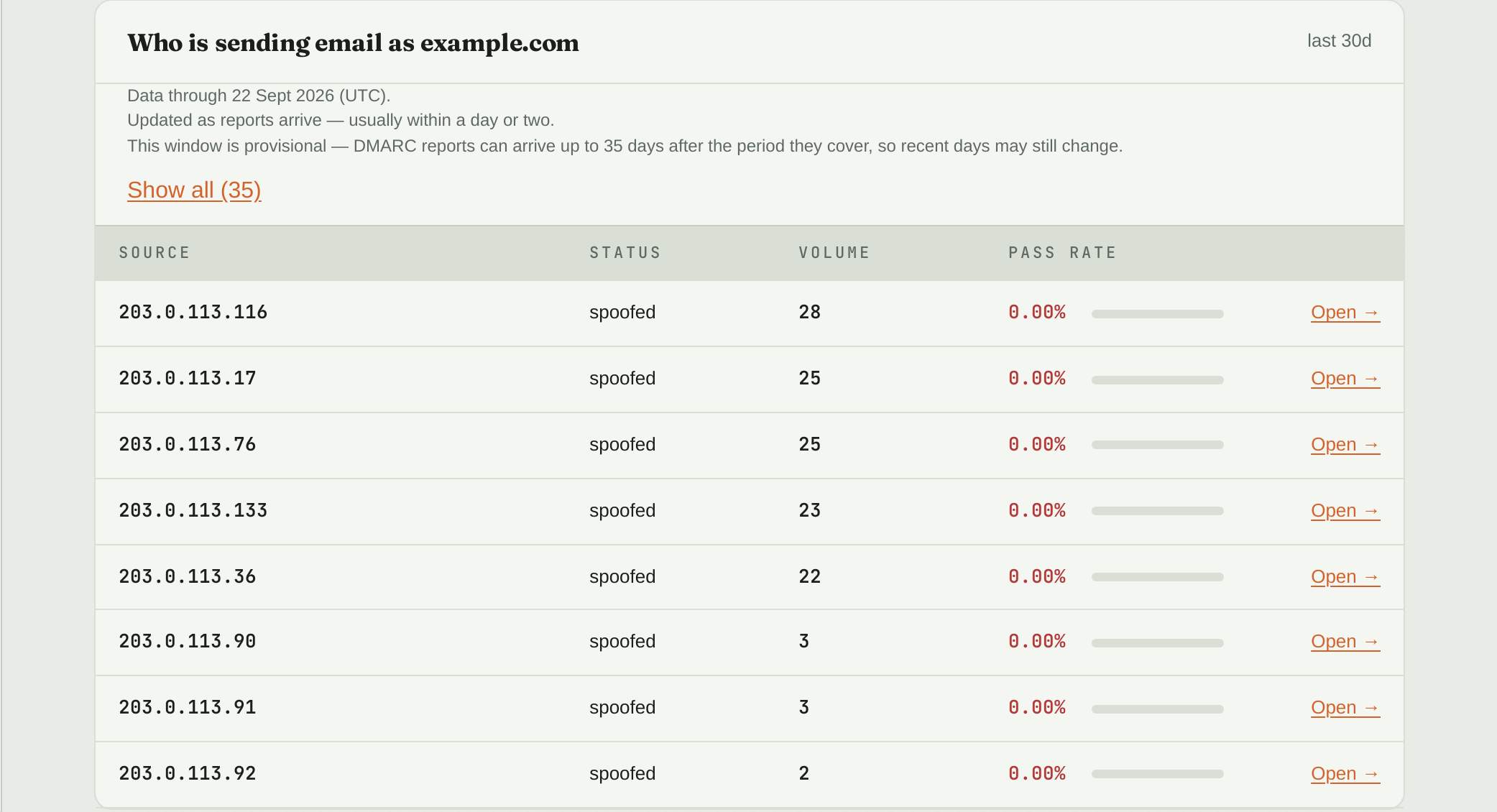
The same XML, read for you and filtered to problems: each row is a server sending as your domain, how many messages it sent, and how many passed. Here every one is an unknown source at a 0% pass rate.
The weekly 10-minute routine
Put this on a recurring calendar reminder. It’s the single habit that keeps a DMARC report from ever becoming a surprise support ticket.
- Open the latest report (or your dashboard, if something is reading reports for you).
- Scan the sender list. Is everything there something you recognize: your app’s email tool, your billing software, Google Workspace or Microsoft 365 if you use them for regular email?
- Check pass/fail for the senders you rely on. If your actual product email is failing, that’s today’s priority. Fix it before anything else.
- Note anything unfamiliar. Small and unfamiliar, keep an eye on it. Large and unfamiliar, go find out what it is before you do anything else with your DNS.
Ten minutes a week catches a failing sender before a customer tells you their invoices stopped arriving.
Why this beats ignoring the email
The report exists because DMARC tells receivers what you want done with mail that fails your checks. Receivers still make the final call: a reject policy doesn’t guarantee a message never gets through some other path, and a quarantine disposition doesn’t guarantee a spam-folder landing every time. But the report is the only place you’ll see a real sender starting to fail before customers start complaining, and the only place you’ll spot an unfamiliar sender using your domain before it turns into an invoice-fraud email your customer actually pays.
Reading the raw XML by hand every day isn’t realistic for most people, and it doesn’t need to be. DMARC Guardian reads these reports for you and shows the sender list, pass/fail, and an “issues only” view so the one row that matters doesn’t get buried in the ones that don’t.