Email Provider Cutover Checklist: Avoid DMARC Failures
The vendor dashboard says the domain is verified. DNS records show green checkmarks. The test message you sent yourself landed fine.
Then production traffic moves over and password resets stop reaching a chunk of users. Invoices land in spam. A Gmail or Microsoft recipient rejects the message outright. Support notices only after customers complain.
Here’s the header that explains why:
From: billing@example.com
Return-Path: bounces@vendor-example.net
DKIM-Signature: d=vendor-example.net; s=mail;
Authentication-Results: mx.google.com;
  spf=pass smtp.mailfrom=vendor-example.net;
  dkim=pass header.d=vendor-example.net;
  dmarc=fail header.from=example.com
SPF passed. DKIM passed. DMARC still failed, because both authenticated identities belong to the vendor’s domain, not example.com. A provider’s own verification step proves you control the domain and that their sending identity works. It does not prove your DMARC record will pass, because that requires an aligned SPF or DKIM pass against your visible From: domain.
This is the operator-level checklist: DNS staging, real header verification, a canary, and a rollback that doesn’t make things worse. If you’re coordinating this for a non-technical team without a DNS/deploy background, send them the plain-English version instead: safe email provider migration without breaking password resets.
Pre-cutover inventory
Don’t start with DNS edits. Start with a list of every stream, so nothing gets silently orphaned mid-migration.
| Stream | Owner | Old provider | New provider | From domain | Batch | Impact if broken |
|---|---|---|---|---|---|---|
| Password reset | App lead | old-transactional.example.net | new-transactional.example.net | example.com | last | account lockout |
| Invoices | Finance ops | old-transactional.example.net | new-transactional.example.net | billing.example.com | second | delayed payment |
| Newsletter | Marketing ops | current CRM | unchanged | news.example.com | unchanged | campaign loss |
| Support replies | Support lead | Helpdesk | unchanged | support.example.com | unchanged | trust damage |
Pull the last 30 days of DMARC aggregate reports and cross-check every IP, DKIM d= domain, and header_from domain currently passing against this table. Anything sending mail that isn’t on the list is a stream you don’t know about yet. Find it before the cutover, not during it.
DNS to stage before the cutover
DKIM for the exact From domain
Get selectors from the new provider and publish them ahead of cutover:
selector1._domainkey.example.com. TXT "v=DKIM1; k=rsa; p=..."Subdomain senders need their own records under that subdomain:
selector1._domainkey.billing.example.com. TXT "v=DKIM1; k=rsa; p=..."Verify publication before sending real traffic:
dig TXT selector1._domainkey.example.com +short
dig TXT selector1._domainkey.billing.example.com +short
Relaxed DMARC alignment lets d=mail.example.com align with From: example.com; strict alignment requires an exact match. Check which mode your DMARC record uses (aspf=/adkim=) before you assume a subdomain DKIM signature will align. See SPF-pass-but-DMARC-fail: the alignment trap for the mechanics if this is new to you. No need to re-derive it here.
SPF, without blowing the lookup budget
SPF only helps DMARC when the return-path domain aligns with the visible From: domain, and many providers default to their own bounce domain. SPF can pass without ever counting toward your DMARC result. Confirm your current record first:
dig TXT example.com +short | grep 'v=spf1'RFC 7208 §4.6.4 caps you at 10 DNS lookups across include, a, mx, ptr, exists, and redirect mechanisms (nested includes count too). One more provider include: can be the one that pushes you over into permerror, which receivers treat as an outright SPF failure. That’s worse than not having SPF at all. If you’ve never hit this limit before, SPF permerror: why adding one SaaS tool breaks your email authentication covers the mechanics in detail.
If you’re already close to the limit, don’t just paste the new include and hope. Options, in order of how much they actually fix the problem:
- Drop dead includes for senders you no longer use.
- Rely on aligned DKIM for the new stream instead of adding another SPF include.
- Flatten: resolve
include:/a:/mx:mechanisms down to theirip4:/ip6:ranges. This doesn’t reduce the receiver’s DNS queries to one. It removes those mechanisms from the 10-lookup count entirely, sinceip4/ip6require no lookup at all. Hosted flattening tools can do this and keep the flattened record in sync as your senders change; a manual flatten is the part that’s easy to get right once and then quietly break the next time someone adds a tool.
DMARC record with reports still flowing
Confirm the record exists before you touch anything else:
dig TXT _dmarc.example.com +shortA monitoring-only starter record during a migration:
_dmarc.example.com. TXT "v=DMARC1; p=none; rua=mailto:reports@example.com"If you’re already enforcing (quarantine or reject), keep enforcing. Don’t drop to p=none “to be safe” during a migration. That’s exactly when you’re introducing new sender paths, and a p=none window means you’d never find out from reports whether a spoofer used the gap.
Check for a subdomain override too. It’s a common reason a migration behaves differently than the root record suggests:
dig TXT _dmarc.billing.example.com +shortIf np=/sp= isn’t set on the subdomain record and you’re relying on the root policy to apply, note that per RFC 9989 §4.7 the fallback is np → sp → p: a root sp=reject with no np= already covers non-existent subdomains, so don’t assume you need a new record just to close that gap.
Canary: move real traffic, not a dashboard test
- Publish DKIM (and SPF, if needed). A low TTL helps propagation speed, not certainty.
- Wait for the records to resolve from the receivers you actually care about, not just your own resolver.
- Send real test messages to Gmail and Microsoft consumer addresses.
- Check raw
Authentication-Resultsfordmarc=passwith at least one aligned result. - If the provider supports percentage-based traffic splitting, move 1–5% of one low-risk stream first. Not every provider offers this; if yours doesn’t, use a separate low-risk stream as your canary instead of forcing a percentage split that isn’t supported.
- Watch bounce rate, complaint rate, and aggregate reports for 24–48 hours.
- Move password resets and invoices last, only after the canary is clean.
In Gmail: open the message, three-dot menu, Show original, check Authentication-Results. You want:
Authentication-Results: mx.google.com;
  spf=pass smtp.mailfrom=bounces.example.com;
  dkim=pass header.d=example.com;
  dmarc=pass header.from=example.com
One aligned pass is sufficient; DMARC doesn’t require both. Get DKIM aligned first if you have to pick, since it survives forwarding, which SPF’s return-path check does not.
What to watch in the first 48 hours
DMARC fail with SPF pass and DKIM pass. Both passes are almost certainly on the provider’s domain, not yours. Enable custom DKIM signing or a bounce domain that aligns with example.com.
SPF permerror. The record is structurally broken, usually the 10-lookup limit or a duplicate v=spf1 record. Fix it now; don’t let it ride because DKIM happens to be covering you today. The next relay or forward path can expose it.
DKIM fail for one stream only. The provider has multiple sending products or regions and only one identity got the selector published. Compare the failing message’s s= selector and d= domain against what’s actually in DNS.
A new source showing quarantine or reject disposition. Evidence to investigate, not proof of what the recipient saw. In DMARC Guardian, filter to Issues Only and check source IP, provider attribution, header_from, SPF result, DKIM result, and disposition together. Provider attribution is a lead, not a verdict. Confirm before you act on it.
Rollback without making it worse
Deleting DNS and hoping isn’t a rollback plan. DNS caches mean some resolvers keep the old answer for hours, and your app may still have queued or retrying mail addressed through whichever provider is currently configured.
- Switch application traffic back to the old provider.
- Leave the new provider’s DKIM records published through its documented overlap window, and don’t pull them until aggregate reports show no legitimate traffic still uses that selector (the same overlap discipline that matters for DKIM key rotation).
- Keep DMARC reporting on throughout.
- Watch for any mail still leaving through the new provider; queued jobs can outlive the switch by hours.
- Remove the new SPF include only after you’re sure nothing depends on it and the TTL has expired.
Pull DKIM too early and any delayed or retried mail still signed by the new provider starts failing authentication mid-flight. That’s the opposite of what a rollback is for.
Operator checklist
Before:
- Every stream listed with owner, provider, From domain, impact.
- Last 30 days of DMARC sources reviewed against the stream table.
- DKIM published for every new sending domain/subdomain.
- SPF lookup count checked after adding the new include.
- No duplicate
v=spf1records on the same hostname. - Root DMARC record confirmed, reports arriving.
- Subdomain DMARC overrides checked.
- Test messages to Gmail and Microsoft show
dmarc=passin raw headers. - Canary approach, batch order, abort threshold, and rollback owner agreed before deploy.
After:
- Bounce logs checked for permanent 5xx authentication errors.
- Aggregate reports reviewed as they arrive; investigate if expected data doesn’t show up.
- Any
permerror,temperror,dkim=fail, ordmarc=failsource triaged. - Old provider confirmed at zero traffic before removing its SPF include.
- Incident notes updated with final DNS state.
The boring cutover is the one that works
The first symptom of a bad email cutover is rarely an alert. It’s a customer who can’t reset a password, or a finance contact who never got an invoice. Verify alignment in real headers, not dashboard checkmarks. Watch the reports through the whole window, not just the first test send.
Filtering aggregate data down to just the failing sources during a migration is the fastest way to spot a new failure before it becomes a support queue:
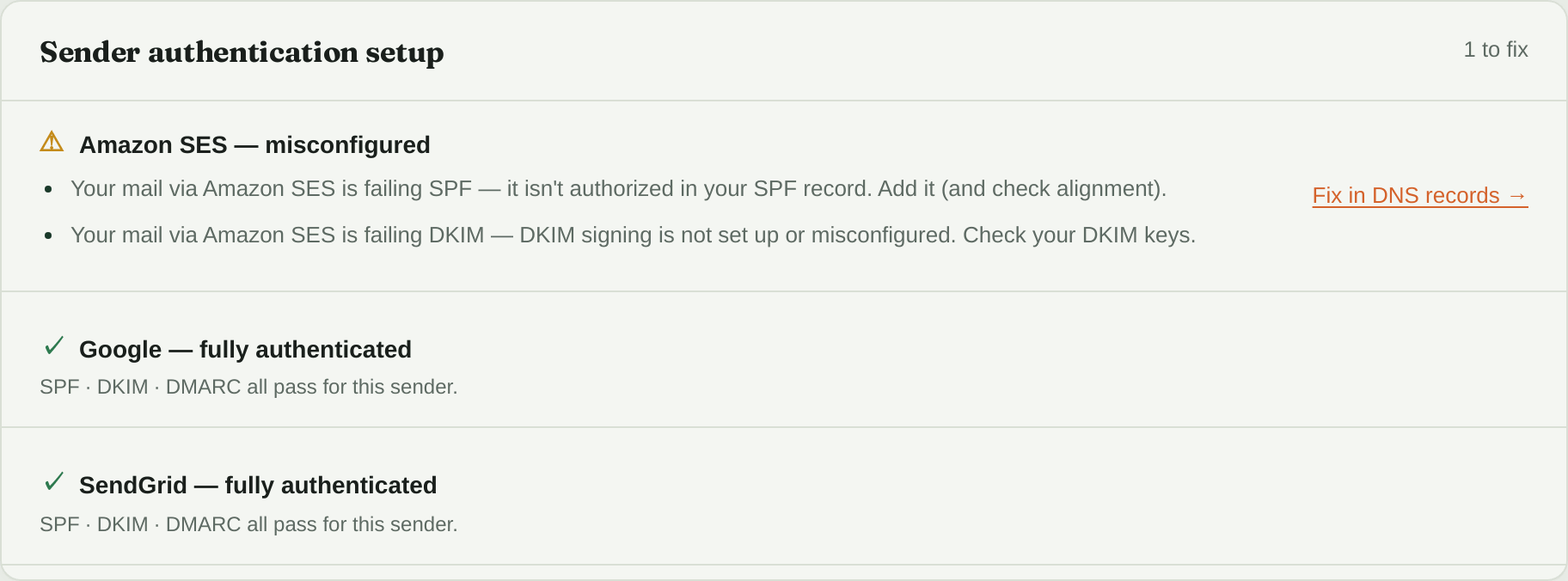
The cutover gone half right: the senders you kept are fully authenticated, and the new one (here Amazon SES) sends mail but passes neither SPF nor DKIM. It’s named, with a link to the DNS record that fixes it.